Audio technology drastically impacts how we experience mobile entertainment, yet many smartphone manufacturers ship devices with flat, uninspiring sound profiles. If you regularly listen to music or watch movies on your phone, you might notice that standard audio processing lacks depth and spatial awareness.
The Dolby Atmos Magisk module solves this problem by bringing premium, theater-grade sound processing directly to your rooted Android device.
By leveraging systemless root modifications, this module completely overhauls your phone’s native audio drivers. You do not have to buy a brand-new flagship phone to get high-quality sound.
With the right files and a few minutes of configuration, you can unlock rich bass, clear dialogue, and immersive 3D spatial audio that breathes life into your favorite media.
What is Dolby Atmos Magisk Module?
The Dolby Atmos Magisk Module is a modified version of Dolby’s audio technology adapted for rooted Android devices. It brings features like surround sound simulation, dynamic equalizer tuning, and improved clarity to devices that don’t officially support Dolby Atmos.
This module integrates directly with your system audio framework using Magisk. Because of this, it works across all apps—whether you are gaming, watching videos, or listening to music. It improves both wired and wireless audio output, making it a popular choice among Android users.
Key Features of Dolby Atmos Module
The module is designed to improve overall sound quality while keeping performance stable. Here are the main features:
- Enhanced surround sound experience
- Clear vocals and balanced audio output
- Deep bass and improved loudness
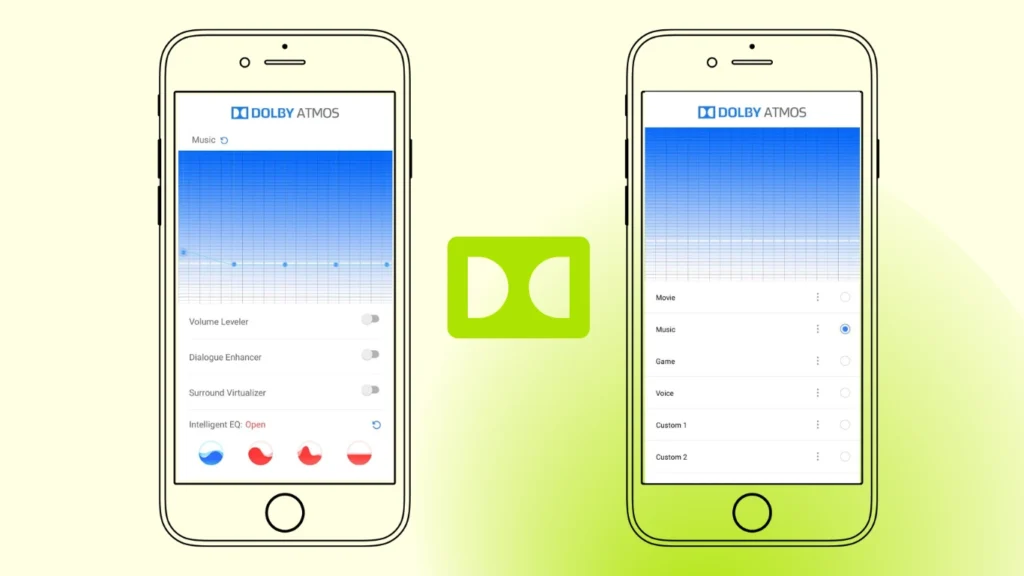
- Built-in equalizer presets
- Works with headphones, speakers, and Bluetooth
- Systemless installation (no system partition changes)
- Compatible with most Android versions
These features make it useful not just for entertainment but also for gaming, where audio positioning matters.
Why Should You Download Dolby Atmos Module?
Experience Enhanced Audio on Your Android Device. Dolby Atmos offers a significant improvement over standard audio. With its 3D surround sound technology, you’ll notice richer lows, clearer mids, and immersive highs that bring your music, movies, and games to life.
This makes it the perfect choice for:
- Audiophiles looking for studio-quality sound.
- Gamers who want to feel every explosion and whisper.
- Movie lovers who crave cinema-like soundscapes.
Requirements Before Installation
Before installing the Dolby Atmos Magisk Module, make sure your device meets the following requirements:
- Rooted Android device using Magisk latest version
- Bootloader unlocked
- Custom recovery (optional but recommended)
- Basic knowledge of Magisk modules
- Backup of your device (important for safety)
Also, ensure you don’t have conflicting audio mods installed, as they can cause issues.
Download Dolby Atmos Magisk Module Latest Version
| Attribute | Details |
|---|---|
| Name | Dolby Atmos Magic Revision Magisk Module |
| Developer | reiryuki |
| File Size | 1.0 MB |
| Compatibility | Android 8.0 (Oreo) and above, including Android 16 |
How to Install Dolby Atmos Magisk Module
Follow these step-by-step instructions to get started with Magisk Bootloop Protector:
- Step: First, download the Dolby Atmos Magisk Zip file from the above link, and copy it into the internal storage
- Step: Launch Magisk Manager and navigate the Modules section.
- Step: Tap on the “install from storage” button to add a module, and select the zip file of the Dolby Atmos Module file that you downloaded.
- Step: Click on Install and wait until it is complete. Installation does not take too long to complete.
- Step: After installation is complete, click Reboot to restart your device to activate the module so the changes take effect.
Compatibility & Supported Devices
The Dolby Atmos Magisk Module supports a wide range of Android devices, including:
- Android 9 to Android 16+
- Most custom ROMs
- Snapdragon, MediaTek, and Exynos processors
FAQs
What does Dolby Atmos Magisk Module do?
It enhances your device’s audio by adding surround sound, better clarity, and improved bass.
Does it work on all Android devices?
It works on most rooted devices, but compatibility depends on ROM and audio drivers.
Final Thoughts
Dolby Atmos Magisk Module is one of the best audio mods for rooted Android devices in 2026, offering noticeable improvements in sound quality without modifying core system files.
If you want better audio for gaming, movies, or music, this module is a simple and effective upgrade. Just make sure to install it correctly and avoid conflicts with other audio mods for the best experience.