When it comes to customizing Android devices, the power of Magisk modules is unparalleled. However, managing these modules can often feel like a time-consuming and complex task,
especially for rooted device owners new to the process. Enter Fox Magisk Module Manager, a game-changing tool designed to simplify the way you handle Magisk modules.
Whether you’re a seasoned Android enthusiast or a curious beginner, this guide will walk you through everything you need to know about Fox Magisk Module Manager, including how to install it, its standout features, top module recommendations, and troubleshooting tips.
What is Fox Magisk Module Manager?
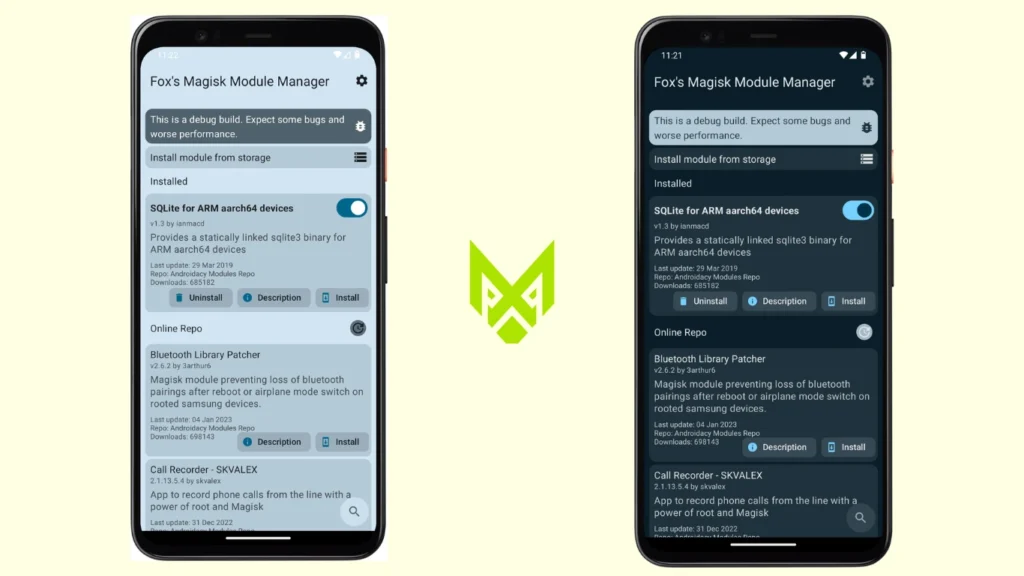
Fox Magisk Module Manager is a third-party application built specifically for managing Magisk modules more efficiently. It acts as a bridge between users and module repositories, allowing you to discover and install modules directly from within the app.
Unlike the older Magisk Manager (which had a built-in repo), newer versions of Magisk removed that feature. Fox fills that gap by providing a clean and user-friendly interface where you can explore updated modules, read descriptions, and install them with just a few taps.
It is especially helpful for beginners who find manual installation confusing, as well as advanced users who frequently test different modules.
Key Features of Fox Magisk Module Manager
Fox Magisk Module Manager focuses on simplicity, compatibility, and control. It improves how you interact with modules compared to the stock Magisk app.
- Built-in online module repository
- One-tap install directly from the app
- Easy module updates and version tracking
- Clean and simple user interface
- Support for modern Magisk and Magisk Delta
- Detailed module descriptions and info
- Quick enable/disable options
These features make it easier to manage modules without switching between multiple sources.
Download Fox Magisk Module Manager: File Information
Download the Fox Magisk Module Manager APK, the ultimate tool for managing Magisk modules on rooted Android devices. Lightweight at just 10 MB, it supports Android 8.0 and above, including 16
| File Information | Details |
|---|---|
| File Name | Fox Magisk Module Manager APK |
| Version | Fox’s v2.0.2 Latest Version (Check official GitHub or XDA for updates) |
| Supported Platforms | Rooted Android devices with Magisk installed |
| Compatibility | Android 8.0 (Oreo) and above, including Android 13 |
| Official Source | GitHub, XDA Developers |
| Requirements | Rooted Android device, Magisk installed, permissions for unknown sources |
| License | Free and Open Source |
Installing Fox Magisk Module Manager: Step-by-Step Guide
- Locate the Downloaded APK
Open your device’s file manager and navigate to the folder where the Fox Magisk Module Manager APK was downloaded. - Start Installation
Tap on the APK file to begin installation. If prompted, enable installation from unknown sources in your device settings. - Complete the Installation
Follow the on-screen instructions to finish installing the app. Once complete, launch the app from your app drawer. - Grant Root Access
On the first launch, the app will request root permissions. Grant the required access to proceed. - Begin Using the App
With root access granted, you can now browse, download, and manage Magisk modules directly from the app.
Congratulations! You’ve successfully installed the Fox Magisk Module Manager and are ready to customize your Android device with powerful Magisk modules.
Frequently Asked Questions (FAQs)
What is Fox Magisk Module Manager used for?
Fox Magisk Module Manager is a powerful tool designed to simplify the management of Magisk modules on rooted Android devices. It allows users to browse, install, update, and uninstall Magisk modules directly from a user-friendly interface, enhancing Android customization.
Is Fox Magisk Module Manager free to use?
Yes, Fox Magisk Module Manager is completely free and open-source. You can download it securely from trusted platforms like our website, GitHub, or XDA Developers without cost.
How do I update modules using Fox Magisk Manager?
Updating modules is seamless with Fox Magisk Manager. Simply open the app, navigate to the installed module list, and check for updates. If an update is available, you can install it with a single tap, ensuring your modules stay up-to-date.
Fox Magisk Manager compatible with all Android devices?
Fox Magisk Module Manager is compatible with rooted Android devices running Android 8.0 (Oreo) and above, including Android 13. However, functionality may vary based on the device and ROM. Ensure your device is rooted with Magisk installed for optimal performance.
Final Thoughts
Fox Magisk Module Manager is an essential tool for rooted Android users looking to simplify and enhance their customization experience. With its intuitive interface, seamless module management, and compatibility with the latest Android versions, it’s the perfect solution for managing Magisk modules effortlessly.
Whether you’re updating, installing, or uninstalling modules, Fox Magisk Manager ensures a smooth, secure, and efficient process. Download it today from our website or trusted sources like GitHub to unlock the full potential of your Android device and take customization to the next level.